MULTIDOMAIN // SIMULATION

Open source · In development

Build the machine. Wire the control. Press Run.

Congegno is an open-source desktop IDE for simulating machines and their control, all drawn as blocks. Mechanisms and controllers run today, natively on Drake; circuits, fluids and heat come next.

See what it does Source code Coming soon

macOS on Apple Silicon · Linux x86_64 and aarch64 · MIT licence

A drawing of the Congegno workspace. On the canvas, a step, a sum and a PID controller drive the revolute joint of a mechanism made of a world frame, the joint and a solid; the joint angle feeds back into the sum and into a scope. On the right, the 3D preview shows the inverted pendulum just past the top. Below, the angle over the first 6.2 seconds of a 10-second run. CANVAS // inverted-pendulum.yaml 3D // PREVIEW SIGNALS // hinge.q CTL STEP 15 deg · 5 s SUM CTL PID kp 40 · kd 6 MCH WORLD g 9.81 m/s² MCH REVOLUTE q0 = 10 deg MCH SOLID L = 500 mm TAU Q q CTL SCOPE XZ q 16.1 deg E 2.31 J 15 0 -15 6.20 s RUN 0042 // 6.20 / 10.00 s

01 // In motion

See it move.

Three short clips, straight from the app.

Coming soon

Move the tool. The joints follow.

A robot arm steered in Cartesian space. Its tool traces a saddle-shaped loop, drawn in gold as it goes, and a controller written in Python turns the path into joint torques.

Coming soon

Same arm. Whole workspace.

The diagram that drives it, the joint angles plotted as they happen, the 3D view beside them.

Coming soon

Balanced by blocks.

An inverted pendulum held at the top by a discrete PID built from blocks. At five seconds it moves 15° past the top and holds there against gravity, its angle and torque drawn over the 3D view.

Coming soon

Field-oriented. In Modelica.

A permanent-magnet motor and its inverter, modelled in Modelica and compiled by OpenModelica, under a field-oriented controller drawn in blocks: the speed loop at 1 kHz, the current loop at 20 kHz in Python. The phase currents quicken with the shaft. Shown at twice its pace.

02 // Block diagrams

If you can draw it, you can run it.

Blocks with ports, signal lines, subsystems with masks, references to other models. Right-click anything. Resize anything. Undo everything.
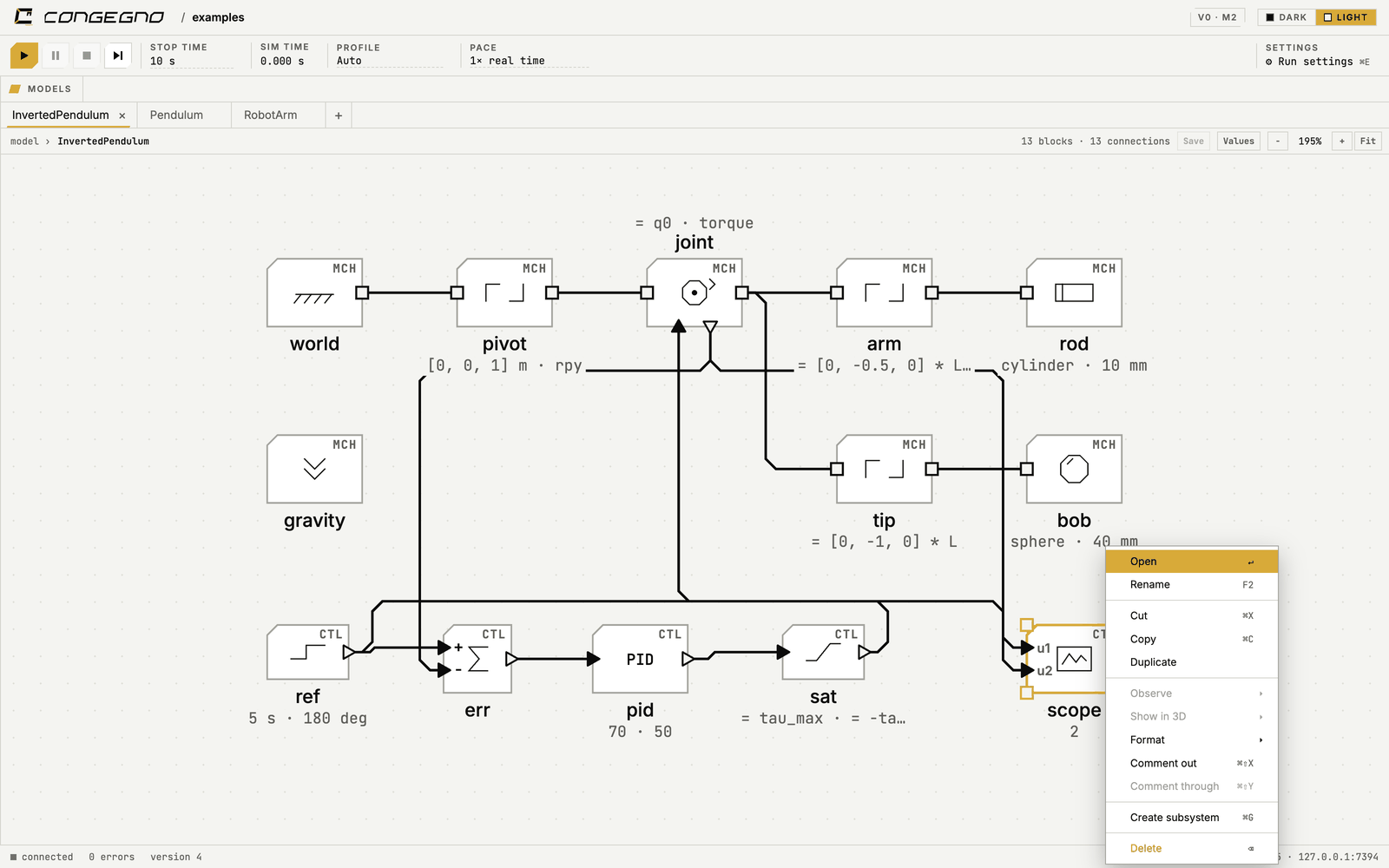
Screenshot of the Congegno canvas: a controller and the mechanism it drives, drawn as one block diagram.
A controller and the mechanism it drives, side by side in one diagram.

Inports and Outports carry signals in and out of subsystems. Copy, paste and a context menu work on every object, and every change is a step you can undo.

03 // Mechanics

Frames and joints. The bodies find themselves.

Connect solids, joints and rigid transforms as a network of frames. Congegno works out which parts move as one body, and the 3D preview shows the mechanism while you build it.
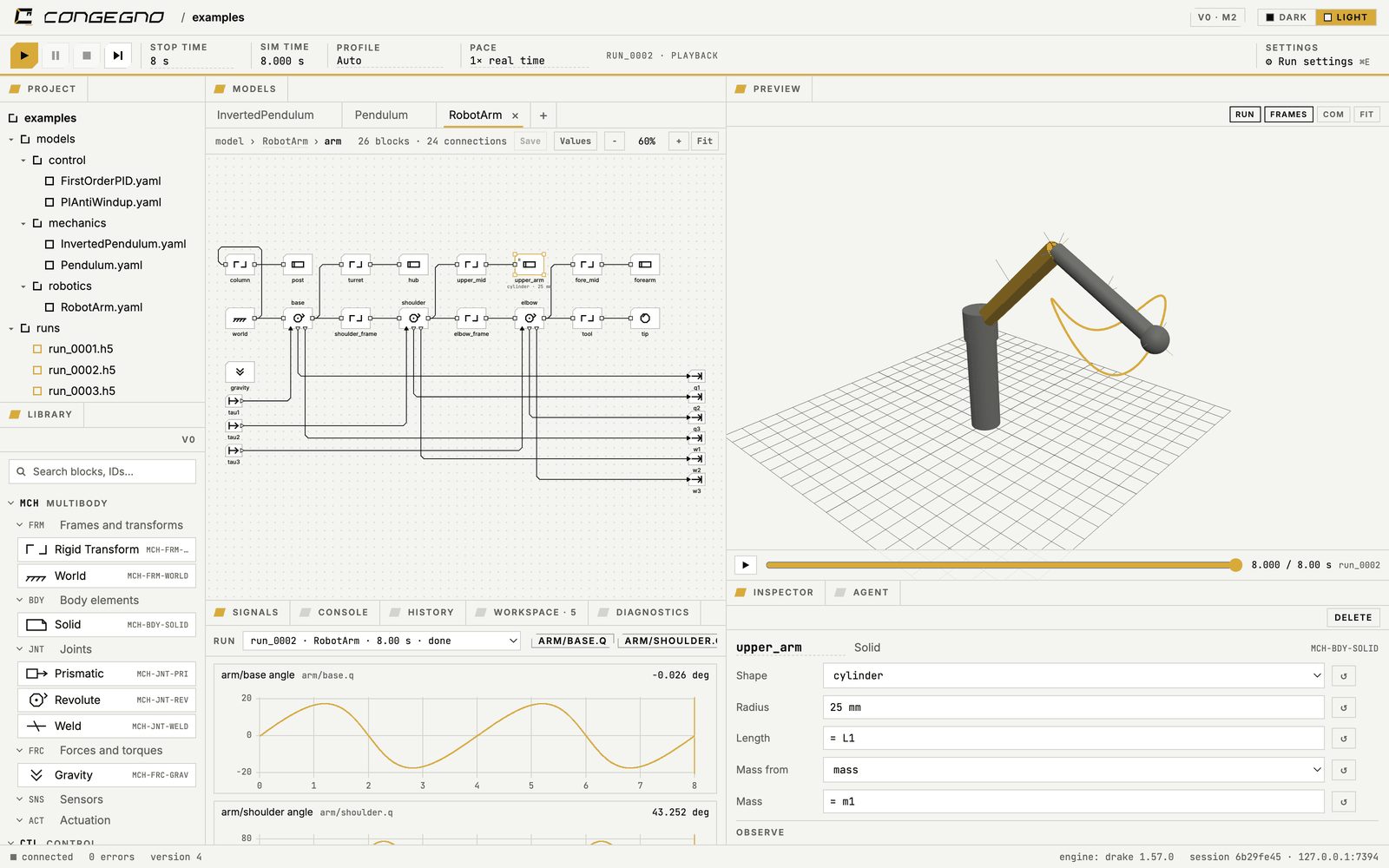
Screenshot of the 3D preview: a mechanism with its frames and joints, the selection shared with the canvas.
Every frame and every joint, live. Select a part here and it is selected on the canvas too.

04 // Physical units

Every number has a unit. Every wire is checked.

Type 500 mm, or = L / 2, wherever a number goes. Signals carry their units into the mechanism, so there are no converter blocks to place, and a mismatch is caught at the connection that causes it.

# pendulum.yaml: one hinge, one rod
model: pendulum
parameters:
  L: 500 mm
blocks:
  world:
    type: World
    gravity: 9.81 m/s^2
  hinge:
    type: Revolute
    q0: 30 deg
    damping: 0.02 N*m*s/rad
  rod:
    type: Solid
    shape: box
    size: [20 mm, 20 mm, = L]
    center: [0 mm, 0 mm, = L / 2]
    density: 2700 kg/m^3
connections:
  - world.F -> hinge.B
  - hinge.F -> rod.R
probes: [hinge.q, hinge.w, energy]
A pendulum, written out: plain text you can read, diff and review like code. Simplified for this page.

05 // Observation

One way to observe. Many ways to look.

Put a probe on any signal or physical quantity: a joint torque, the speed of a frame, the energy of the whole machine. Watch it in a scope, the signal inspector, a 3D overlay or a dashboard.

And every run is a file. One HDF5 file holds the data and the exact model that produced it.
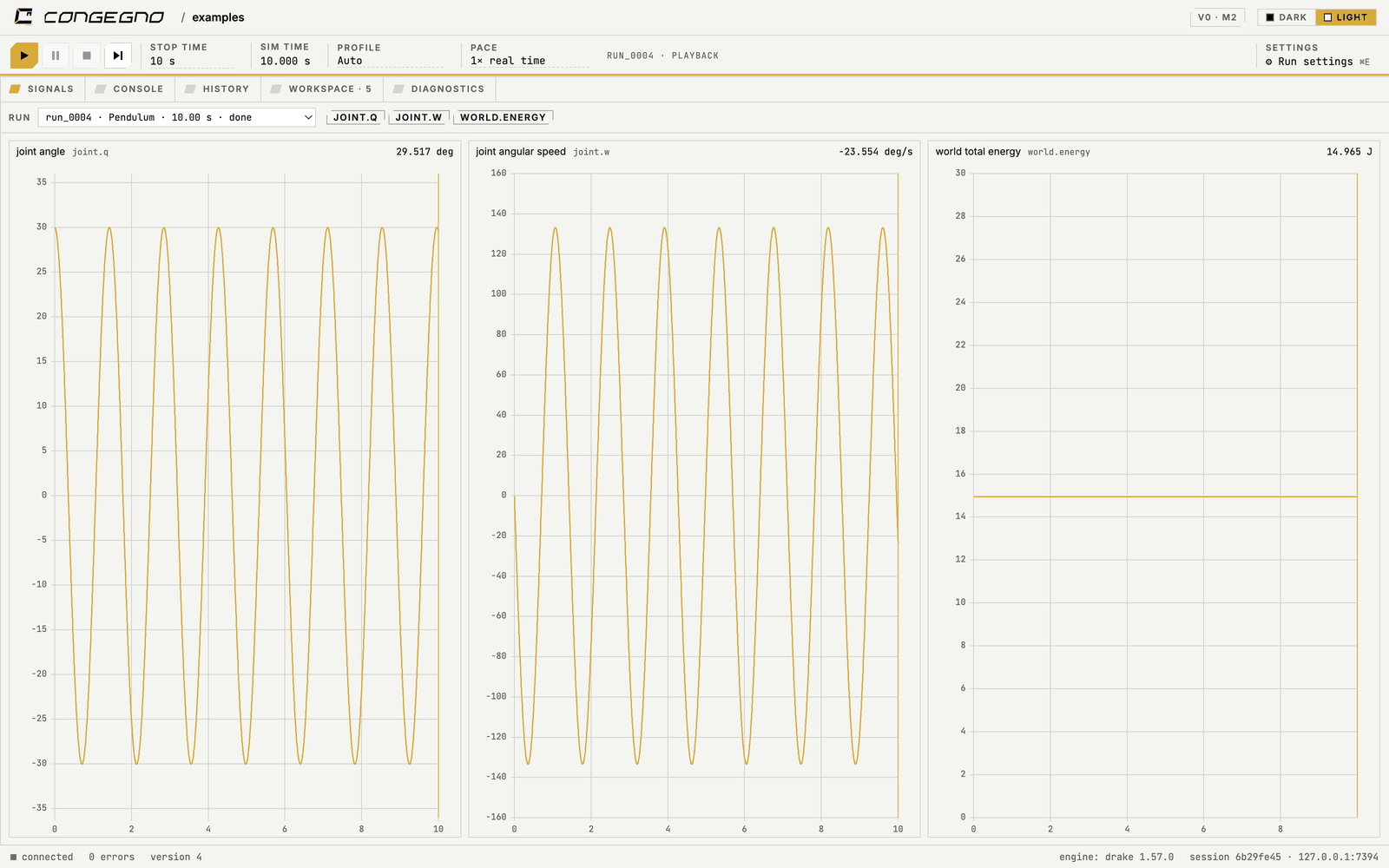
Screenshot of the signal inspector after a run, with the angle, speed and energy of a pendulum plotted over time.
The signal inspector after a run: angle, speed and energy on one time axis.

06 // The workbench

Everything within reach.

  • Library

    Every block opens.

    Read how any block is built. The originals stay read-only; your variants go into libraries of your own.

  • CAD

    Bring your CAD.

    Shape a solid from a function, or link a STEP, STL or FreeCAD file. Congegno converts it for each engine, without asking.

  • Commands

    One session. Many hands.

    The GUI, the command line, your scripts and your AI agent drive the same session, with the same undo history.

  • Workspace

    Your desk, your layout.

    Resize any panel, pop it out into its own window, dock it back. In light or in dark.

07 // How it works

Nothing interpreted. Not one block.

Before a run, Congegno compiles the whole model. Control blocks become native systems inside Drake. Python Function blocks are written in a checked subset of Python and traced into native systems too, with their errors shown on the line as you type.

  1. 01 // Model

    A text file.

    YAML you can read, diff and review.

  2. 02 // Compiler

    Checked.

    Units, connections and Python, before anything moves.

  3. 03 // Engine

    Native.

    Drake runs the mechanism and its control as one system.

  4. 04 // Run

    A file.

    HDF5: the data, and the model that made it.

One more thing

Not just mechanisms.

A machine is a mechanism, a circuit, a fluid and heat, all at once, and its control talks to all of them. Congegno joins the domains through typed physical ports: torque and speed, voltage and current, pressure and mass flow, temperature and heat flow.

A motor drive drawn on the Congegno canvas. A speed reference, a speed PI at 1 kHz, a current PI and a space-vector modulator at 20 kHz drive an inverter; the inverter feeds a permanent-magnet motor through an electrical connection, and the motor turns a revolute joint. The phase currents return to the current loop through the Clarke and Park transforms, the joint speed to the speed loop, and the rotor angle reaches the modulator and the transforms through Goto and From tags. CANVAS // motor-drive.yaml CTL SPEED REF 3000 rpm CTL SPEED PI 1 kHz CTL CURRENT PI dq // 20 kHz CTL MODULATOR SVPWM // 20 kHz iq* vd vq [q] ELC INVERTER 48 V DC PWM ELC PMSM 4 pole pairs MCH REVOLUTE shoulder w q CTL CLARKE PARK abc / dq ia ib [q] id iq [q]

ELC + CTL + MCH // Today

A motor drive.

An inverter and its motor, modelled in Modelica, with the field-oriented controller that runs them: the speed loop at 1 kHz, the current loop at 20 kHz, and the shaft turning a flywheel with a weight. It runs: Video 04.

A propellant feed system drawn on the Congegno canvas. Pressurant, regulator, tank and latch valve form a fluid line that feeds two thrusters through a manifold; a pulse modulator commands the thruster valves through Goto and From tags, the thrusts act on a body, and the propellant's mass leaves the tank and the body with it. CANVAS // feed-system.yaml FLD PRESSURANT 200 bar FLD REGULATOR 20 bar FLD TANK 12 kg FLD LATCH VALVE open PRP THRUSTER A PRP THRUSTER B CTL THRUST CMD 0..1 CTL PULSE MOD 50 ms [cmd] [cmd] [cmd] MCH BODY mass and inertia from the tank F F [m] [m]

FLD + PRP + MCH + CTL // Planned

A propellant feed system.

Pressurant, regulator, tank and valves feeding two thrusters. The valves answer to a pulse modulator, and the propellant that leaves takes its mass and inertia away from the body that carries it.

  • 01 // MCH

    Multibody

    Bodies and joints, solids from CAD.

    Today

  • 02 // ELC

    Electrical

    Motors, drives and power buses, in Modelica.

    Today

  • 03 // FLD

    Fluid

    Pipes, tanks, valves and pumps.

    Planned

  • 04 // PRP

    Propulsion

    Thrusters, and the propellant they spend.

    Planned

  • 05 // THM

    Thermal

    Heat, from where it is made to where it goes.

    Planned

  • 06 // CTL

    Control

    Block diagrams and Python, each at its own rate.

    Today

Multibody, control and electrical run today: the electrical side as Modelica models, compiled to FMU by OpenModelica and run inside the same simulation. Fluid and thermal come the same way, then propulsion.

08 // Status

Not released yet. Here is how far it is.

  1. M0

    Shell

    The desktop window with every panel, the command line, and the session they share.

    Done
  2. M1

    Mechanics

    Frames, solids and joints, units and expressions, model files, the live 3D preview.

    Done
  3. M2

    Runs

    Runs on Drake, probes and plots, 3D playback, one file per run.

    Done
  4. M3

    Editing and control

    Context menus, subsystems, signal lines, control blocks, Python Function blocks.

    In progress
  5. M4

    Second engine

    A second physics engine behind the same model, solver profiles, and parity tests between the two.

    Next

Built and tested on macOS with Apple Silicon and on Linux, x86_64 and aarch64.

09 // Open source

Built on open source. Released as open source.

Congegno is MIT-licensed, and it stands on:

  • DrakeThe robotics toolbox that computes the dynamics, used as a library.
  • PythonThe back-end, your scripts, and the Python Function blocks.
  • VueThe workspace you see and click.
  • FreeCADThe companion CAD tool.
  • OpenModelicaCompiles the electrical, fluid and thermal models to FMU, to run inside the same simulation.
  • pixiOne command to install everything and run it.